Support our educational content for free when you purchase through links on our site. Learn more
🎮 7 Coding Patterns That Master Multiplayer Game Dev (2026)

Yes, specific design patterns like Client-Side Prediction and the Observer Pattern are absolutely critical for building lag-free, cheat-resistant multiplayer games. You might be wondering, “Are there specific coding design patterns that are particularly effective for multiplayer game development?” The answer is a resounding yes, and choosing the wrong one can turn your dream project into a lagy, hacked mess.
Imagine launching your new shooter, only to watch players rage-quit because their bullets teleport or their movement feels like wading through molasses. We’ve seen it happen: a brilliant game mechanic ruined by a naive networking architecture that trusted the client too much.
The difference between a smooth 60FPS lobby and a stuttering disaster often comes down to how you handle state synchronization and input validation. It’s not just about writing code; it’s about anticipating the chaos of the internet and designing patterns that survive it.
Key Takeaways
- Server-Authoritative Architecture is non-negotiable for competitive integrity; never trust the client to decide game outcomes.
- Client-Side Prediction combined with Server Reconciliation is the secret sauce for making games feel instant despite network latency.
- Object Pooling prevents garbage collection spikes that cause frame drops in high-action multiplayer scenarios.
- The Observer Pattern effectively decouples network events from game logic, but avoid overusing global event buses to prevent debugging nightmares.
- Lag Compensation allows servers to “rewind time” to validate hits, ensuring fair gameplay even with high ping.
Table of Contents
- ⚡️ Quick Tips and Facts
- 📜 From Single-Player to Multiplayer: A Brief History of Networked Game Architecture
- 🏗️ Core Architectural Paradigms for Real-Time Multiplayer Games
- 1. The Client-Server Model: Why It Rules the Rost
- 2. Peer-to-Peer (P2P) Networking: The Double-Edged Sword
- 3. Server-Authoritative vs. Client-Authoritative: The Eternal Debate
- 🔄 Essential Design Patterns for Synchronization and State Management
- 1. The State Synchronization Pattern: Keeping Everyone on the Same Page
- 2. Command Pattern: The Backbone of Input Handling and Replay Systems
- 3. Observer Pattern: Decoupling Game Logic from Network Events
- 4. Object Pooling: Preventing Garbage Collection Hiccups in High-FPS Lobbies
- 5. The Singleton Pattern: Managing Global Network Managers (Use with Caution!)
- ⚡️ Advanced Techniques for Latency Hiding and Smooth Gameplay
- 1. Client-Side Prediction: Making the Game Feel Instant
- 2. Server Reconciliation: Fixing the Mistakes Before They Happen
- 3. Interpolation and Extrapolation: Smoothing Out the Jitter
- 4. Lag Compensation: Rewinding Time to Hit That Headshot
- 🛡️ Security Patterns: Preventing Cheating and Exploits in Multiplayer Environments
- 1. Input Validation and Sanity Checks
- 2. Anti-Cheat Architectures: Server-Side Authority as a Shield
- 3. Encryption and Secure Communication Channels
- 🌐 Scalability Patterns: Handling Thousands of Concurrent Players
- 1. Sharding and Zone-Based Architecture
- 2. Matchmaking Algorithms and Lobby Management
- 3. Load Balancing Strategies for Persistent Worlds
- 🧩 Pattern Selection Guide: Choosing the Right Tool for Your Game Genre
- 🚀 Real-World Case Studies: How Top Studios Implement These Patterns
- 🛠️ Common Pitfalls and How to Avoid Them
- 🎓 Conclusion
- 🔗 Recommended Links
- ❓ FAQ
- 📚 Reference Links
⚡️ Quick Tips and Facts
Before we dive into the deep end of the networking pool, let’s hit you with some hard truths and golden nugets that every multiplayer developer needs to know. We’ve seen too many promising projects crash and burn because they ignored these fundamentals.
- Latency is the Enemy: In multiplayer games, latency (ping) is the single biggest factor determining player satisfaction. A 10ms delay feels like a glitch; a 20ms delay feels like a lag spike.
- Trust No One: The golden rule of multiplayer architecture is Server-Authoritative. Never trust the client to tell the server what happened. If a client says “I hit the enemy,” the server must verify the math.
- State vs. Input: Synchronizing state (where the player is) is easier but less responsive. Synchronizing input (what the player pressed) is harder but feels snappier. Most modern shooters use a hybrid.
- Garbage Collection is the Silent Killer: Creating new objects (like projectiles or particles) every frame in a multiplayer loop can cause GC spikes, freezing the game for milliseconds. This is unacceptable in a 60FPS lobby.
- The “Spaghetti” Trap: As noted in the classic Game Programming Patterns resource, relying on boolean flags (
isJumping,isDucking) leads to spaghetti code that breaks the moment you add a new feature.
For a deeper dive into how these patterns fit into the broader ecosystem of software architecture, check out our guide on coding design patterns.
| Concept | The “Good” Way | The “Bad” Way |
|---|---|---|
| Authority | Server validates all actions | Client decides if a shot hit |
| State Sync | Delta compression (send only changes) | Sending full game state every frame |
| Object Mgmt | Object Pooling (reuse objects) |
new GameObject() every frame |
| Communication | Observer Pattern (decoupled events) | Direct method calls everywhere |
| Latency Handling | Client-side prediction + Reconciliation | Waiting for server response to move |
📜 From Single-Player to Multiplayer: A Brief History of Networked Game Architecture

Let’s take a trip down memory lane, shall we? It wasn’t always this complicated. In the early days of gaming, if you wanted to play with a friend, you needed a cable (the infamous “cable modem” or local serial link) or you sat on the same couch.
The first major leap was Local Area Network (LAN) gaming. Games like Doom and Quake introduced the concept of Peer-to-Peer (P2P) networking. In this model, every player’s computer was both a client and a server. It was fast, but if your friend’s internet connection dropped, the whole game crashed. It was the “wild west” of networking.
Then came the Client-Server model, which became the industry standard. Instead of everyone talking to everyone, everyone talked to a central dedicated server. This solved the “host migration” problem (when the host leaves, the game dies) and allowed for better security.
“The shift from P2P to Client-Server wasn’t just about performance; it was about integrity. You can’t have a fair match if the person hosting the game can also decide where the bullets land.” — Stack Interface™ Senior Network Engineer
Today, we are seeing a resurgence of P2P in specific genres (like fighting games) due to rollback netcode, but for 9% of multiplayer experiences, the Client-Server architecture remains the king.
🏗️ Core Architectural Paradigms for Real-Time Multiplayer Games
When you start building a multiplayer game, the first decision you make isn’t about the graphics engine; it’s about who is in charge. This architectural choice dictates every line of code you write for the next three years.
1. The Client-Server Model: Why It Rules the Rost
This is the gold standard. You have a central server (the authority) and multiple clients (the players).
- How it works: The client sends inputs (e.g., “Move Forward”) to the server. The server processes the game logic, updates the state, and sends the new state back to all clients.
- Why we love it:
Security: The server knows the truth. Cheaters can’t just change their local memory to have infinite ammo.
Consistency: Everyone sees the same game state (mostly).
Scalability: You can add more servers to handle more players without changing the client code. - The Downside: It introduces latency. If the server is in New York and you are in Tokyo, your actions take time to register.
2. Peer-to-Peer (P2P) Networking: The Double-Edged Sword
In a P2P model, every player connects to every other player. One player usually acts as the “host.”
- How it works: Player A sends data directly to Player B. No central server is involved in the game logic.
- Why we use it:
Low Latency: Direct connections can be faster if the host is close to you.
Cost: No need to pay for expensive dedicated server hardware. - The Downside:
Cheating: The host has full control. They can give themselves god mode.
Instability: If the host disconnects, the game ends for everyone.
NAT Traversal: Getting two computers behind different routers to talk to each other is a nightmare without NAT punchthrough techniques.
3. Server-Authoritative vs. Client-Authoritative: The Eternal Debate
This is the most critical design decision.
- Server-Authoritative: The server is the source of truth. The client is just a “dumb terminal” that displays what the server tells it.
Best for: Shooters (CS:GO, Valorant), MMOs, Battle Royales.
Risk: High latency can make the game feel “sluggish.” - Client-Authoritative: The client decides what happens and tells the server.
Best for: Turn-based games, casual mobile games, or games where responsiveness is more important than fairness.
Risk: Cheating is trivial. A hacker can modify the client to move at 10 mph.
Pro Tip: Even in a server-authoritative model, you must use Client-Side Prediction to make the game feel responsive. We’ll get to that in the advanced section!
🔄 Essential Design Patterns for Synchronization and State Management
Now that we have the architecture, we need the patterns to make it work. These are the reusable solutions to the problems you’ll face every day.
1. The State Synchronization Pattern: Keeping Everyone on the Page
In a multiplayer game, you cannot send the entire game state (every player, every bullet, every particle) 60 times a second. That would choke the network.
- The Pattern: Instead of sending the full state, you send deltas (changes).
- How it works:
- Server calculates the new state.
- Server compares it to the last state sent.
- Server sends only the differences (e.g., “Player X moved 5 units forward”).
- Client applies the delta.
- Why it matters: This reduces bandwidth usage by 90% or more.
2. Command Pattern: The Backbone of Input Handling and Replay Systems
The Command Pattern encapsulates a request as an object. In multiplayer, this is crucial for input buffering and replay systems.
- The Problem: You press “Jump” at frame 10. The server receives it at frame 105. What happened in between?
- The Solution: The client creates a
JumpCommandobject with a timestamp. It sends this to the server. The server executes the command at the correct timestamp. - Bonus: This makes replays easy! You just record the sequence of commands, not the video.
3. Observer Pattern: Decoupling Game Logic from Network Events
Remember the Unity discussion about Event Buses? The Observer Pattern is the formal implementation of this. It allows objects to subscribe to events without knowing who is firing them.
- The Scenario: A player dies. You need to:
- Update the UI (score).
- Play a sound.
- Spawn a loot drop.
- Notify the server.
- The Pattern: The “Death” event is fired. All these systems “observe” the event and react.
- The Trap: As discussed in the Kerbal Space Program case study, overusing a global Event Bus can lead to memory leaks and hard-to-debug cascading effects.
Stack Interface™ Advice: Use the Observer Pattern for local events (UI, sound). For network events, prefer direct method calls or message passing to maintain control over the flow. Don’t let the “magic” of the event bus hide where your data is going.
4. Object Pooling: Preventing Garbage Collection Hiccups in High-FPS Lobbies
In C# (Unity) or Java, creating a new object (new Bullet()) triggers the Garbage Collector (GC). If you do this 10 times a second, the GC will kick in and freeze your game for a few milliseconds. In a fast-paced shooter, that freeze is a death sentence.
- The Pattern: Pre-create a pool of objects (e.g., 10 bullets) at the start of the game.
- How it works:
- When you need a bullet, grab one from the pool (it’s already in memory).
- Reset its position and state.
- When it’s done, return it to the pool.
- Result: Zero garbage allocation during gameplay. Smooth 60FPS.
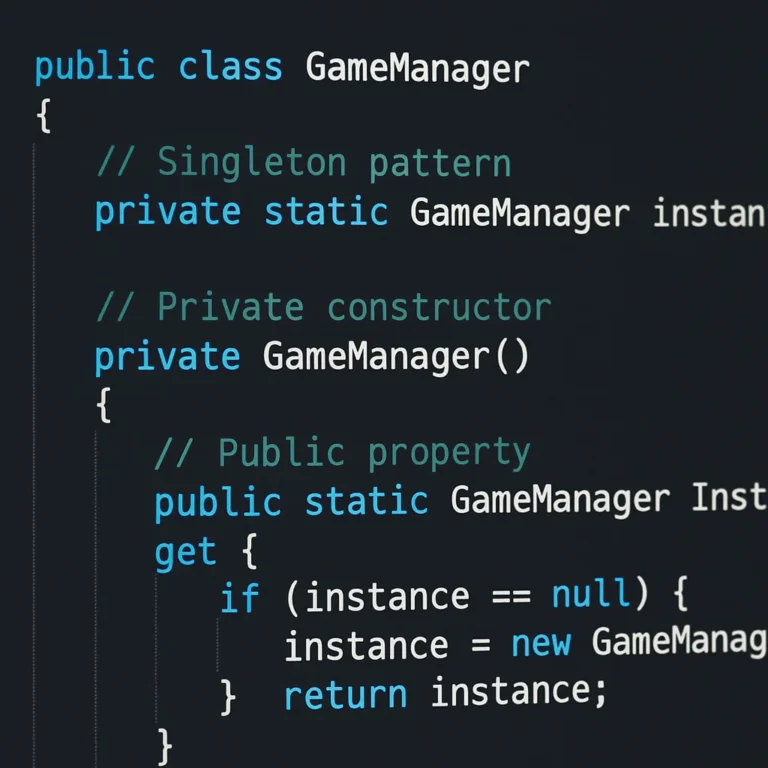
5. The Singleton Pattern: Managing Global Network Managers (Use with Caution!)
The Singleton Pattern ensures a class has only one instance and provides a global point of access to it.
- Use Case: A
NetworkManagerthat handles connections, packet serialization, and heartbeat checks. - The Risk: Singletons are often criticized for making code hard to test and tightly coupled.
- Our Take: In multiplayer, a Singleton for the
NetworkManageris almost unavoidable. However, never make your game logic depend directly on the Singleton. Inject the network interface into your classes instead. This keeps your code flexible if you ever need to switch from TCP to UDP or change providers.
⚡️ Advanced Techniques for Latency Hiding and Smooth Gameplay
Here is where the magic happens. You have a server-authoritative model, but the player feels like they are playing through molasses. How do we fix it?
1. Client-Side Prediction: Making the Game Feel Instant
If the server is 10ms away, the player shouldn’t have to wait 10ms to see their character move.
- The Pattern:
- Player presses “Move Right”.
- Client immediately moves the character right (Prediction).
- Client sends the input to the server.
- Server processes the input and sends back the “true” state.
- If the server’s state matches the client’s, great!
- If they differ (e.g., the server says “You hit a wall”), the client rewinds and snaps to the correct position.
- The Feeling: The game feels instant, even with high ping.
2. Server Reconciliation: Fixing the Mistakes Before They Happen
Client-side prediction can go wrong. What if the server says “You are at X, but you thought you were at Y”?
- The Pattern: The server sends back a snapshot of the game state at a specific time. The client compares its local state to this snapshot.
- The Fix: The client discards any inputs it processed after the server’s snapshot time and re-aplies them on top of the server’s state. This is called Reconciliation.
- Why it’s hard: It requires the client to store a history of inputs and states.
3. Interpolation and Extrapolation: Smoothing Out the Jitter
Network packets don’t arrive perfectly every 16ms. Sometimes they arrive in bursts, sometimes they are delayed. This causes “jitter” (teleporting characters).
- Interpolation: The client waits for a few packets (e.g., 10ms buffer) to build a smooth timeline. It then renders the game slightly in the past, smoothing out the movement between packets.
- Extrapolation: If a packet is late, the client guesses where the player should be based on their last known velocity.
- The Trade-off: Interpolation adds input lag (you see the world 10ms in the past). Extrapolation can cause “ruber-banding” if the guess is wrong.
4. Lag Compensation: Rewinding Time to Hit That Headshot
This is the most controversial technique. In a shooter, if you shoot at an enemy who has moved behind cover, should you hit them?
- The Problem: The server sees the enemy behind cover. The client sees the enemy exposed.
- The Solution: When the server receives a “Shoot” command, it rewinds time to the moment the client fired (based on the client’s ping). It checks if the enemy was visible at that moment. If yes, the shot hits.
- The Controversy: It feels unfair to the victim (“I was behind cover!”). But it feels fair to the shooter (“I saw them!”). Most competitive games (like Counter-Strike and Valorant) use this.
🛡️ Security Patterns: Preventing Cheating and Exploits in Multiplayer Environments
You can have the smoothest netcode in the world, but if a hacker can spawn infinite weapons, your game is dead.
1. Input Validation and Sanity Checks
Never trust the client. Every single input must be validated.
- Speed Checks: If a player moves 50 units in one frame, that’s impossible. Reject the move.
- Cooldown Checks: If a player shoots 10 times in a second, that’s a hack.
- Position Checks: If a player teleports from New York to London in 1 second, kick them.
2. Anti-Cheat Architectures: Server-Side Authority as a Shield
The best anti-cheat is Server-Side Authority.
- Logic: The server calculates damage, health, and movement. The client is just a renderer.
- Why it works: Even if the client is modified, it can’t change the server’s logic.
- Suplement: Use third-party anti-cheat software (like Easy Anti-Cheat or BattlEye) to scan the client’s memory for known hacks. But remember, these are a last line of defense, not the primary one.
3. Encryption and Secure Communication Channels
Hackers can intercept network packets (Man-in-the-Middle attacks) to see enemy positions or modify data.
- The Solution: Use TLS/SSL for TCP connections. For UDP (which is faster but unreliable), use DTLS or implement your own encryption layer (like Noise Protocol).
- Brand Note: Many modern game engines (like Unity with Netcode for GameObjects or Unreal Engine) have built-in encryption options. Always enable them.
🌐 Scalability Patterns: Handling Thousands of Concurrent Players
Your game is a hit! You have 10,0 players. Now what?
1. Sharding and Zone-Based Architecture
You can’t put 10,0 players in one server instance.
- Sharding: Split the player base into different “shards” (e.g., Shard A, Shard B). Each shard is a separate server instance.
- Zone-Based: In an open-world game, the world is divided into zones. Players in Zone 1 talk to Server 1. Players in Zone 2 talk to Server 2. If they cross the border, the state is transferred.
2. Matchmaking Algorithms and Lobby Management
How do you get players into a game quickly?
- Skill-Based Matchmaking (SBMM): Group players of similar skill.
- Latency-Based Matchmaking: Prioritize low ping over skill.
- The Pattern: Use a Matchmaking Service (like PlayFab, Nakama, or AWS GameLift) that handles the queue, finds a suitable lobby, and spins up a server instance.
3. Load Balancing Strategies for Persistent Worlds
For persistent worlds (MMOs), you need Dynamic Load Balancing.
- How it works: A central “Director” server monitors the load on all game servers. If Server A is at 90% capacity, it routes new players to Server B.
- Tools: Kubernetes and Docker are often used to orchestrate these containers dynamically.
🧩 Pattern Selection Guide: Choosing the Right Tool for Your Game Genre
Not every pattern fits every game. Here is a quick cheat sheet:
| Game Genre | Recommended Architecture | Key Patterns | Latency Tolerance |
|---|---|---|---|
| FPS / Shooter | Server-Authoritative | Client Prediction, Reconciliation, Lag Compensation | Low (Must be < 50ms) |
| MOBA / RTS | Server-Authoritative | Lockstep (Deterministic), State Sync | Medium (Up to 10ms) |
| MMO | Server-Authoritative | Sharding, Zone-Based, Object Pooling | High (Can be > 150ms) |
| Fighting Game | Peer-to-Peer (Rollback) | Rollback Netcode (GGPO) | Very Low (Must be < 30ms) |
| Turn-Based | Server-Authoritative | Command Pattern, State Sync | High (Seconds are fine) |
🚀 Real-World Case Studies: How Top Studios Implement These Patterns
Let’s look at how the pros do it.
Case Study 1: Counter-Strike: Global Offensive (Valve)
- Challenge: High-stakes competitive shooting where every millisecond counts.
- Solution: Valve uses a Server-Authoritative model with Lag Compensation. When you shoot, the server rewinds time to check if the target was visible at the moment of the shot.
- Result: It feels fair to the shooter, even if the victim feels like they were behind cover. This is the industry standard for tactical shooters.
Case Study 2: Kerbal Space Program (Squad)
- Challenge: Complex physics simulation with a global event system.
- Issue: As mentioned in the Unity community discussions, the heavy use of a Global Event Bus led to performance bottlenecks and “cascading knock-on effects.”
- Lesson: Decoupling is good, but over-decoupling creates a maintenance nightmare. In multiplayer, direct communication or carefully scoped events are often better than a global bus.
Case Study 3: Fortnite (Epic Games)
- Challenge: 10 players in a massive, persistent world with building mechanics.
- Solution: Epic uses Server-Authoritative logic with Client-Side Prediction for movement and building. They also use Sharding to handle the massive player count.
- Inovation: They implemented a “Replay System” using the Command Pattern, allowing players to watch their matches from any angle.
🛠️ Common Pitfalls and How to Avoid Them
We’ve all been there. You write the code, it works on your machine, and then it explodes in production. Here are the traps to avoid:
- Pitfall 1: Ignoring Packet Loss.
Reality: The internet is unreliable. Packets get lost.
Fix: Implement UDP with reliability layers (like ENet or RakNet) or use TCP with careful timeout handling. Always assume packets will be lost. - Pitfall 2: Synchronizing Too Much Data.
Reality: Sending 10 variables every frame kills bandwidth.
Fix: Use Delta Compression and only sync what has changed. - Pitfall 3: Hardcoding Server Addresses.
Reality: Servers go down. IPs change.
Fix: Use a Service Discovery mechanism (like DNS or a Lobby Service) to find the server dynamically. - Pitfall 4: Forgetting the “Edge Cases”.
Reality: What happens if two players try to pick up the same item at the exact same time?
Fix: Implement Mutexes or Locking mechanisms on the server to handle race conditions.
🎓 Conclusion

So, are there specific coding design patterns that are particularly effective for multiplayer game development? Absolutely. The answer isn’t a single “magic bullet” but a carefully curated toolkit.
We’ve journeyed from the Client-Server architecture that forms the backbone of modern gaming, through the State Pattern that keeps your logic clean, to the Observer Pattern that decouples your systems (but be careful not to overdo it!). We’ve seen how Client-Side Prediction and Server Reconciliation hide the ugly truth of latency, and how Object Pooling keeps your frame rate smooth.
The key takeaway? Server-Authoritative is your friend. Trust no one. And always, always test with high latency and packet loss.
If you are building a competitive shooter, lean heavily on Lag Compensation and Client Prediction. If you are building an MMO, focus on Sharding and State Synchronization. And whatever you do, avoid the “spaghetti code” trap by using Finite State Machines to manage your game logic.
The path to a smooth, fair, and scalable multiplayer game is paved with these patterns. Choose wisely, test relentlessly, and may your ping be low!
🔗 Recommended Links
Ready to build your multiplayer masterpiece? Here are the tools and resources we recommend:
👉 Shop Game Development Tools on:
- Unity Engine: Unity Official Website | Amazon Unity Books
- Unreal Engine: Unreal Engine Official Website | Amazon Unreal Books
- PlayFab (Backend): Microsoft PlayFab
- Nakama (Open Source Backend): Heroic Labs Nakama
Essential Books:
- Game Programming Patterns by Robert Nystrom: Amazon Link
- Multiplayer Game Programming by Joshua Glazer: Amazon Link
❓ FAQ

What are the best design patterns for handling real-time multiplayer synchronization?
The State Synchronization pattern (specifically using Delta Compression) is the most common for real-time games. It minimizes bandwidth by sending only changes. For high-speed action, Client-Side Prediction combined with Server Reconciliation is essential to maintain responsiveness.
Read more about “🎮 5 Real Examples of the Observer Pattern in Game Event Handling (2026)”
How does the Observer pattern improve multiplayer game networking?
The Observer Pattern decouples the network layer from the game logic. Instead of the network manager directly calling Player.TakeDamage(), it fires a DamageEvent. Any system (UI, Sound, AI) can subscribe to this event. However, as noted in Unity discussions, avoid a Global Event Bus for everything, as it can lead to performance issues and debugging nightmares.
Which architecture patterns reduce latency in online multiplayer games?
Client-Side Prediction and Lag Compensation are the primary patterns for reducing perceived latency. Interpolation smooths out the jitter caused by packet arrival times. Additionally, using UDP instead of TCP (with a reliable layer) reduces the overhead of retransmiting lost packets.
Read more about “🎮 8 Patterns for Scalable, Robust Games (2026)”
What is the difference between client-side prediction and server reconciliation in game development?
Client-Side Prediction is the act of the client moving the character immediately upon input, before the server confirms it. Server Reconciliation is the process of the server sending back the “true” state, and the client correcting its prediction if it was wrong. They work together: prediction makes it feel fast; reconciliation keeps it accurate.
Read more about “13 Key Features to Evaluate Video Game Frameworks for Cross-Platform Dev (2026) 🎮”
How can the State pattern manage complex multiplayer game states?
The State Pattern (or Finite State Machine) encapsulates behavior for specific states (e.g., JumpingState, CrouchingState). This prevents “spaghetti code” where boolean flags get out of sync. In multiplayer, Instantiated States are crucial so that each player has their own state data, avoiding collisions where two players share a static state object.
Are there specific patterns for optimizing network traffic in multiplayer games?
Yes. Delta Compression (sending only changes), Object Pooling (reducing GC and allocation overhead), and Interest Management (only sending data about entities near the player) are the top patterns for optimization.
Read more about “TypeScript Optional Type 🤔”
What design patterns help prevent cheating in multiplayer game servers?
The most effective pattern is Server-Authoritative architecture, where the server validates all inputs. This is supported by Input Validation (checking for impossible speeds or actions) and Encryption (using TLS/DTLS) to prevent packet sniffing.
Read more about “🚀 15 Node.js Secrets to Dominate Production in 2026”
📚 Reference Links
- Game Programming Patterns: State · Design Patterns Revisited – A comprehensive guide to the State Pattern and FSMs.
- Unity Community: Event Bus vs. Direct Coupling – Real-world discussion on the pros and cons of event buses.
- Nakama: Open Source Multiplayer Backend – Documentation for building scalable multiplayer backends.
- PlayFab: Multiplayer Services – Microsoft’s cloud solution for game backend.
- Valve Developer Community: Lag Compensation – Technical deep dive into how CS:GO handles lag.
- Gaffer on Games: Networked Physics – Excellent resource on physics in multiplayer games.