Support our educational content for free when you purchase through links on our site. Learn more
🎮 15 Practical Design Pattern Examples for Apps and Games

The best places to find practical examples of design patterns in app and game code are Game Programming Patterns, Refactoring.Guru, and open-source projects such as Godot, Bevy, and Android’s architecture samples. Start with a real coding problem—like tangled character states or input controls—then study how an example solves it.
That distinction saves time. We’ve seen developers reach for a whole State pattern when a simple switch would do, and others wrestle with a giant conditional long after it had outgrown its welcome. The useful examples show both the solution and the trade-offs.
This guide maps 15 patterns and architecture approaches to familiar app and game scenarios, with sources to explore in C#, C++, Java, Swift, Python, and TypeScript. The goal isn’t to collect pattern names like achievement badges; it’s to recognize when a pattern makes your code easier to change, test, and understand.
Key Takeaways
- Start with real examples: Game Programming Patterns is a strong resource for game-specific problems; Refactoring.Guru offers a broad, language-spanning pattern catalog.
- Inspect working code: Open-source apps, games, engines, and official framework examples reveal how patterns behave alongside tests, lifecycles, and real constraints.
- Match the pattern to the problem: State can organize complex character behavior, Command can support remappable input and undo, and Observer can connect events to UI updates.
- Treat patterns as options, not rules: A clear conditional or built-in language feature may be simpler than an elaborate pattern implementation.
- Check the trade-offs: Look at ownership, cleanup, testability, and added complexity—not just class names or diagrams.
Table of Contents
- ⚡ Quick Tips and Facts
- 🧭 Where to Find Practical Design Pattern Examples
- Game Programming Patterns and Its Source Code
- Open-Source Apps, Games, and Frameworks
- Official Documentation and Example Projects
- Tutorials, Repositories, and Code Search
- 🎮 15 Design Pattern Examples in App and Game Code
- 1. State Pattern: Managing Character and UI States
- 2. Command Pattern: Configuring Input and Supporting Undo
- 3. Observer Pattern: Events, Signals, and Game UI Updates
- 4. Strategy Pattern: Swappable Behaviors and Algorithms
- 5. Factory Pattern: Creating Actors, Enemies, and App Objects
- 6. Object Pool Pattern: Reusing Bulets, Effects, and UI Elements
- 7. Component Pattern: Building Flexible Game Actors
- 8. Entity-Component-System: Organizing Large Game Worlds
- 9. Model-View-Controller and Model-View-ViewModel
- 10. Repository Pattern: Separating App Data from Storage
- 11. Adapter Pattern: Connecting APIs, SDKs, and Game Systems
- 12. Decorator Pattern: Adding Features Without Class Explosion
- 13. State Machine Pattern: Menus, Workflows, and Gameplay
- 14. Undo and Redo: Command History in Apps and Editors
- 15. Service Locator and Dependency Injection: A Classy or Dysfunctional Fit?
- 📱 App Patterns vs. Game Patterns: What Changes?
- 🔎 How to Read and Evaluate Pattern Examples
- 🛠️ Find Examples in Your Language and Engine
- C# and Unity
- C++ and Unreal Engine
- Java and Android
- Swift and iOS
- JavaScript, TypeScript, and Web Apps
- Python and Godot
- ⚠️ Common Design Pattern Mistakes
- ✅ Quick Tips for Applying Patterns in Real Projects
- Conclusion
- Recommended Links
- FAQ
- Reference Links
⚡ Quick Tips and Facts
| Takeaway | Practical meaning |
|---|---|
| Start with code, not pattern names. | Find an actual problem—such as tangled input handling—then look for an example that solves it. Our coding design patterns guide is a useful companion. |
| Read game-specific examples at Game Programming Patterns. | Its chapters connect patterns to recognizable problems such as character states, configurable input, and undoable actions. |
| Browse the catalog at Refactoring.Guru. | It organizes classic patterns by intent and pairs explanations with diagrams and code. |
| Patterns are tools, not requirements. | A small if statement may be clearer than a state machine; a language’s built-in callback may be simpler than a class-based Command. |
| Try examples in your own language. | Compare the idea across Java, C#, C++, Python, Swift, and TypeScript. |
| Check the surrounding code, not just the pattern-shaped class. | A pattern is useful only if it improves the design of the whole feature: testing, extension, readability, and ownership all count. |
The practical question isn’t “Which pattern should we use?” It’s “Where can we see this problem solved clearly, and does that solution fit our app or game?” Let’s find the examples—and keep an eye out for the moment when a neat pattern becomes unnecessary scaffolding.
🧭 Where to Find Practical Design Pattern Examples
Game Programming Patterns and Its Source Code
For game-specific examples, start with Game Programming Patterns. Robert Nystrom’s free online book takes familiar gameplay problems—characters changing behavior, input controls, objects communicating—and shows how code structures can help. The site’s source code repository lets you inspect and experiment with examples rather than treating them as diagrams in a glass case.
Two especially useful starting points:
- State: how to manage behavior that changes with a character’s current mode.
- Command: how to turn actions into objects or callbacks for input mapping, AI, and undo.
These examples are strongest when you want to understand why a pattern addresses a specific gameplay problem. They are not a ready-made architecture for every engine or project. For instance, an example using a small character class won’t automatically answer how to organize a networked multiplayer game with dozens of interacting systems. That’s where you adapt the idea—and test it against your actual constraints.
Open-Source Apps, Games, and Frameworks
Real repositories show patterns in their natural habitat: alongside tests, framework conventions, edge cases, and code that may not be textbook-perfect. Useful places to look include:
- Godot Engine: a large open-source game engine with real-world systems and tests.
- Bevy: a Rust game engine that illustrates an entity-component-system architecture.
- Flutter samples: example apps for exploring UI structure and application state.
- Android architecture samples: implementations that illustrate common Android app architecture approaches.
- Kotlin samples: Android examples using Kotlin and platform APIs.
- RxJS: a JavaScript library whose observable streams help illustrate event-driven and reactive approaches.
- Unity’s scripting documentation: engine guidance for scripts, components, and project workflows.
A repository is evidence of how code is used in that project, not proof that every structure in it is a pattern you should copy. Large codebases contain historical decisions, performance optimizations, compatibility layers, and occasionally the equivalent of a mysterious drawer full of cables. Read contribution guides and tests, then trace one feature end to end.
Official Documentation and Example Projects
Official docs are valuable when the pattern meets a specific platform or framework. They explain the APIs, lifecycle, and idioms surrounding the code, which third-party summaries can skip.
| What you’re building | A good documentation starting point | What to look for |
|---|---|---|
| Android app | Android architecture recommendations | UI state, data layers, and separation of responsibilities |
| iOS app | Apple’s Swift documentation and SwiftUI documentation | Value types, views, state, and framework-native data flow |
| Unity game | Unity Manual: Scripting |
MonoBehaviour, components, serialization, and scene lifecycle |
| Unreal Engine game | Unreal Engine programming documentation | C++ conventions, gameplay framework, and engine object model |
| Godot game | Godot documentation | Nodes, scenes, signals, and GDScript or C# workflows |
| Web app | MDN JavaScript Guide | Native functions, classes, modules, events, and asynchronous code |
Use the official docs to verify framework-specific behavior. Use a pattern catalog to learn the general design idea. They answer different questions.
Tutorials, Repositories, and Code Search
For a broader catalog, Refactoring.Guru’s design pattern guide covers 22 classic patterns grouped by purpose. Its tutorials are good for a first pass; its example archive helps you compare implementations in different languages.
Code search can then lead you to projects using a pattern in context:
- Search for the pattern name plus your framework, such as
command pattern Unity,MVM SwiftUI, orobserver RxJS. - Search repositories for likely API names—such as
ICommand,Observable,State, orFactory—but don’t assume a matching class name guarantees a good example. - Open the tests, sample app, or demo scene. They often reveal intended usage faster than the implementation alone.
- Trace how the object is created, used, and disposed of. Lifecycle is where many “simple” examples get interesting.
- Compare at least two approaches before choosing one.
For our broader guides to coding best practices, back-end technologies, and AI in software development, explore the related Stack Interface™ categories.
🎮 15 Design Pattern Examples in App and Game Code
Here are practical examples organized around problems you may actually encounter. Some are classic Gang of Four patterns; others are common architecture styles or game-programing idioms. That distinction matters: not every useful code structure is one of the original 23 patterns.
1. State Pattern: Managing Character and UI States
A character that can stand, jump, duck, and dive has behavior that depends on its current state. A quick implementation might accumulate Boolean flags:
isJumping
isDucking
isDiving
``

That seems harmless until the character is **jumping and ducking**, or **diving while standing**. How many flags can be true at once? If the answer is “it depends,” the code may need a clearer model.

The [State pattern example](https://gameprogramingpatterns.com/state.html) develops this problem with a platformer heroine. Start with a single current-state value, such as `Standing`, `Jumping`, or `Ducking`; then move state-specific behavior and data into separate state objects as the logic grows.

```text
Character
 currentState: State

State
 handleInput()
 update()
 enter()
 exit()
``

| Approach | Works well when | Watch out for |
|---|---|---|
| Boolean flags | A couple of independent on/off conditions | Invalid combinations multiply quickly |
| Enum plus `switch` | Few states and simple transitions | State-specific logic can spread across large methods |
| State objects | States have distinct behavior or their own data | More classes and transition plumbing |

As the chapter explains, finite state machines are useful for a **relatively small, distinct set of states** responding to events over time. They can also structure menus, workflows, and protocol behavior. For complex AI, behavior trees or planning systems may fit better. The source’s own advice is refreshingly practical: **“Sometimes an `if` is all you need.”**

### 2. Command Pattern: Configuring Input and Supporting Undo

The [Command pattern](https://gameprogramingpatterns.com/command.html) wraps an action—such as jump, fire, or move—so it can be selected, queued, replayed, or reversed. The chapter calls it **“a reified method call”**: a method call represented as an object.

Instead of hard-wiring a key to `jump()`, an input system can map a button to a command:

```text
Input handler → JumpCommand → Character.jump()
``

That gives you a practical path to:

- **Remappable controls:** change the command associated with a button without rewriting input logic.
- **AI actions:** let player input and computer-controlled actors issue the same kinds of actions.
- **Queued actions:** produce commands now and execute them later.
- **Undo:** store the information needed to reverse an operation.

For a level editor, a `MoveUnitCommand` can remember the selected unit and destination, then capture its original position when executed. Undo restores that position. A history can support multiple undo and redo steps; after undoing, a new action typically clears the discarded “future” history.

The chapter also makes a memorable point about tooling: **“The surest way to make your game designers hate you is giving them a level editor that can't undo their fat-fingered mistakes.”** The practical caveat? Undo works reliably only when all relevant changes go through the command history.

### 3. Observer Pattern: Events, Signals, and Game UI Updates

The Observer pattern lets one object notify interested listeners when something happens. In a game, a health system might publish a health-changed event; a UI widget listens and refreshes the health bar. In an app, a data layer may notify a screen that new information is available.

```text
Health changes → event emitted → health bar updates
``

This avoids tightly coupling the health system to a particular UI. The [Refactoring.Guru Observer guide](https://refactoring.guru/design-patterns/observer) explains the pattern’s publisher-and-subscriber structure; [RxJS](https://rxjs.dev/guide/overview) offers observable streams for JavaScript applications.

**Benefits:** parts of the program can react without the publisher knowing every listener. **Drawbacks:** if subscriptions are hidden, it can be harder to trace why a callback ran—or remember to unsubscribe when an object is destroyed. In Unity, [C# events](https://learn.microsoft.com/en-us/dotnet/csharp/events-overview) are one familiar option; Godot’s [signals](https://docs.godotengine.org/en/stable/getting_started/step_by_step/signals.html) provide an engine-native alternative.

### 4. Strategy Pattern: Swappable Behaviors and Algorithms

Strategy is useful when a program needs to choose among interchangeable ways of doing something. A game might choose between pathfinding strategies; an app might swap sorting, pricing, or authentication policies.

```text
Navigation system → Pathfinding strategy
 ├── AStarStrategy
 └── DirectMovementStrategy
``

This keeps a system from growing a sprawling conditional for every behavior. The [Strategy pattern overview](https://refactoring.guru/design-patterns/strategy) describes the general approach.

Choose it when behavior genuinely varies and needs to be selected independently. Avoid creating a family of tiny classes when a simple function or conditional is clearer. In languages with first-class functions, a strategy may just be a function passed into another function—no pattern-shaped class required.

### 5. Factory Pattern: Creating Actors, Enemies, and App Objects

A factory centralizes object creation. A game might create an enemy from a type identifier; an app might construct a service using configuration or a platform-specific implementation.

```text
EnemyFactory.create("flying") → FlyingEnemy
``

This is particularly helpful when construction requires several dependencies, assets, or setup steps. It also keeps callers from depending on every concrete type.

The trade-off is another layer to maintain. If creating the object is simply `new Enemy()`, a factory may add indirection without solving a real problem. See [Refactoring.Guru’s Factory Method explanation](https://refactoring.guru/design-patterns/factory-method) and compare it with your framework’s own dependency or asset-loading system.

### 6. Object Pool Pattern: Reusing Bulets, Effects, and UI Elements

An object pool keeps reusable objects ready rather than repeatedly creating and discarding them. It can be useful for bursts of short-lived objects—projectiles, particle effects, or temporary UI elements—especially when profiling shows allocation or creation overhead is a problem.

| Pool step | Example |
|---|---|
| Acquire | Get an inactive projectile |
| Initialize | Set position, direction, and damage |
| Use | Run the projectile |
| Release | Disable it and return it to the pool |

Pooling has costs: pooled objects need careful reset logic, consume memory while idle, and can retain stale state if release is incomplete. **Profile first.** Don’t pool every object because a blog post made allocation sound scary. Unity documents reusable object workflows in its [Unity Learn resources](https://learn.unity.com/); adapt the approach to your engine’s lifecycle and performance tools.

### 7. Component Pattern: Building Flexible Game Actors

The Component pattern assembles behavior from smaller pieces instead of putting every capability into one deep inheritance tree. An actor could combine movement, health, inventory, and audio components. This lets different actors share selected behaviors without requiring a separate subclass for every combination.

```text
Player: Movement + Health + Inventory + Audio
Crate: Health
Enemy: Movement + Health + AI
``

The benefit is flexibility; the risk is that behavior becomes scattered across components, making it harder to see the whole actor. Keep component ownership and communication clear. Unity’s [component-based workflow](https://docs.unity3d.com/Manual/GameObjects.html) offers a familiar example of attaching behavior to GameObjects.

### 8. Entity-Component-System: Organizing Large Game Worlds

An Entity-Component-System (ECS) separates **entities** (identities), **components** (data), and **systems** (operations on that data). A movement system, for example, can process entities with position and velocity components.

ECS is a common architecture in game development, but it is **not simply another name for the classic Component pattern**. Implementations vary significantly: some prioritize data-oriented processing, others emphasize modular composition. [Bevy’s official ECS documentation](https://bevyengine.org/learn/quick-start/geting-started/ecs/) explains its model; [Unity’s Entities documentation](https://docs.unity3d.com/Packages/com.unity.entities@latest) covers Unity’s ECS package.

Consider ECS when the project’s scale, data flow, or performance needs justify it. For a small game with a handful of actors, a straightforward object model may be easier to understand and maintain.

### 9. Model-View-Controller and Model-View-ViewModel

MVC and MVM organize the relationship between application data, user interface, and interaction logic. They are architectural patterns rather than single classes to paste into a project.

- **Model:** application data and rules.
- **View:** what the user sees.
- **Controller or ViewModel:** coordinates interaction and presentation state.

Android’s architecture guidance recommends separating concerns across UI and data layers; Apple’s SwiftUI documentation describes views that reflect state. Start with the platform’s conventions—trying to force a textbook MVC structure into every framework can create unnecessary layers.

### 10. Repository Pattern: Separating App Data from Storage

A repository gives application code a consistent way to access data, hiding whether it comes from a database, network API, or local cache.

```text
Screen → Repository → API / database / cache
``

That can make testing easier: a fake repository can supply predictable data without a real server. But a repository that merely renames every database function may add no meaningful separation. Android’s [architecture recommendations](https://developer.android.com/topic/architecture) provide a platform-specific starting point for thinking about data layers and responsibility boundaries.

### 11. Adapter Pattern: Connecting APIs, SDKs, and Game Systems

An Adapter translates one interface into another. A game might wrap a third-party input API so gameplay systems use a stable interface; an app might adapt an external service response to the app’s own data model.

```text
External SDK → Adapter → Application interface
``

This is useful when you want to isolate vendor-specific details. If the SDK changes, ideally only the adapter needs revision. The [Adapter pattern guide](https://refactoring.guru/design-patterns/adapter) walks through the general structure.

The design cost is another abstraction. Use an adapter when there’s a real mismatch or a likely boundary change—not just to rename a method.

### 12. Decorator Pattern: Adding Features Without Class Explosion

A Decorator wraps an object to add behavior while preserving an interface. A game might wrap a weapon with temporary damage effects; an app might decorate a data source with caching or logging.

```text
Base service → Caching decorator → Logging decorator
``

Decorators can compose features without creating a subclass for every combination. Their downside is that behavior can become difficult to trace through a long wrapper chain. The [Decorator pattern guide](https://refactoring.guru/design-patterns/decorator) includes diagrams and examples; keep the wrapping order visible and test the combinations you actually support.

### 13. State Machine Pattern: Menus, Workflows, and Gameplay

A finite state machine (FSM) models a system using a set of states and explicit transitions. A pause menu might transition between `Closed`, `Open`, and `Settings`; a network connection might move through `Connecting`, `Connected`, and `Disconnected`.

The [Game Programming Patterns State chapter](https://gameprogramingpatterns.com/state.html) distinguishes a simple FSM—often an enum and switch—from the more object-oriented State pattern. Use the simple version while it remains clear. Move toward state objects when each state has distinct behavior or data.

For more complex AI, an FSM can become too constrained. Behavior trees or planning systems may better represent layered decisions. The right model depends on the problem, not on which diagram looks most impressive.

### 14. Undo and Redo: Command History in Apps and Editors

Undo and redo are practical features in drawing apps, level editors, and strategy games. The Command pattern supports them by making each change explicit and storing the information needed to reverse or reapply it.

A robust workflow:

1. Represent each meaningful edit as a command.
2. Record the command’s original state or inverse operation.
3. Execute it and append it to history.
4. On undo, reverse the latest command and move the history cursor back.
5. On redo, reapply the next command.
6. If a new edit happens after undo, discard the old redo branch.

The tricky part is comprehensive coverage: a single direct mutation outside the command system can make history inconsistent. The [Command chapter](https://gameprogramingpatterns.com/command.html) discusses the approach in games and tools. For app architecture and data handling, see Stack Interface™’s [back-end technologies category](https://stackinterface.com/category/back-end-technologies/).

### 15. Service Locator and Dependency Injection: A Classy or Dysfunctional Fit?

Both approaches provide a class with dependencies such as storage, networking, or audio. Dependency injection passes those dependencies in; a service locator lets code request them from a central registry.

| Approach | Strength | Risk |
|---|---|---|
| Constructor injection | Dependencies are visible and easy to replace in tests | Long constructors if responsibility boundaries are poor |
| Service locator | Convenient access, especially in some engine workflows | Dependencies can become hidden and global |
| Direct construction | Simple for small, self-contained objects | Harder to substitute or configure when complexity grows |

Neither is automatically “enterprise” or “bad.” Look at how dependencies are created, scoped, and tested. Unity’s [Dependency Injection guidance](https://unity.com/how-to/dependency-injection-unity) discusses approaches for Unity projects; the general principle applies across app and game code: **make important dependencies understandable, and avoid magic global access when it obscures ownership**.

## 📱 App Patterns vs. Game Patterns: What Changes?

Many patterns cross between apps and games; their pressure points differ.

| Concern | Typical app emphasis | Typical game emphasis |
|---|---|---|
| State changes | Screen, form, request, and session state | Character behavior, animation, simulation, and game modes |
| Events | UI updates, data changes, and asynchronous results | Gameplay events, input, AI, and engine signals |
| Performance | Network use, startup, memory, and responsiveness | Frame time, allocations, rendering, and simulation |
| Object lifetime | Views, services, tasks, and data caches | Scenes, actors, pooled objects, and engine-managed objects |
| Testing | Business rules, view models, and API boundaries | Gameplay rules, deterministic systems, and simulations |

These are tendencies, not rigid categories. A mobile game is still an app with networking and UI architecture; a productivity app can have real-time state and event systems. When a video game pattern example looks unfamiliar, translate the **problem**, not its exact class names.

## 🔎 How to Read and Evaluate Pattern Examples

A good example should explain more than the “after” diagram. Ask:

1. **What was difficult before the pattern?** Look for tangled conditionals, duplicated code, rigid dependencies, or hard-to-test behavior.
2. **Which part of the code is changing?** A pattern should isolate variation or make a relationship clearer.
3. **What new complexity does it add?** Count interfaces, objects, callbacks, and ownership rules.
4. **How does it fail?** Check invalid state, missing listeners, disposal, errors, and concurrent access where relevant.
5. **Can you test it?** Good boundaries often make behavior easier to test, but extra abstractions can also create busywork.
6. **Is the example using modern language features?** A class-based Command might be more ceremony than a closure in JavaScript.
7. **Does it match your framework’s idioms?** Prefer platform-native event, state, and lifecycle patterns where they solve the same problem well.

A humorous (#featured-video) makes the point through a developer’s career arc: junior code is Play-Doh, senior code is the Sistine Chapel, and the principal engineer realizes nobody wants to maintain an ornate cathedral when a simple shape will do. The joke lands because the advice is real: **problem-solving matters more than memorizing pattern names**.

The video also introduces the Gang of Four’s influential catalog of **23 patterns**, grouped into creational, structural, and behavioral categories. That is a useful vocabulary, but not a mandate. Refactoring.Guru describes patterns as reusable “blueprints,” and emphasizes their shared communication value; its [pattern catalog](https://refactoring.guru/design-patterns) is a strong learning reference. The video’s complementary warning—to use language features before implementing a fancy pattern—is equally worth trusting. A pattern is a description of a useful structure, not a tax on every feature.

The [Command chapter](https://gameprogramingpatterns.com/command.html) and [State chapter](https://gameprogramingpatterns.com/state.html) provide deeper game-specific examples. Together, they show why one source may favor a general pattern and another may prefer a simpler implementation: **they may be solving different scales of problem**.

## 🛠️ Find Examples in Your Language and Engine

### C# and Unity

Start with [Unity’s scripting manual](https://docs.unity3d.com/Manual/ScriptingSection.html) for engine-specific scripts and [Refactoring.Guru’s C# examples](https://refactoring.guru/design-patterns/csharp) for language-level patterns. Look for Unity examples involving components, events, ScriptableObjects, and object lifecycles; don’t assume every familiar pattern should be implemented as a `MonoBehaviour`.

### C++ and Unreal Engine

Use Unreal’s [C++ programming documentation](https://dev.epicgames.com/documentation/en-us/unreal-engine/programing-with-cplusplus-in-unreal-engine) to understand its reflection, object, and gameplay conventions. For standalone patterns, compare the [C++ catalog](https://refactoring.guru/design-patterns/cpp) with the C++ examples in [Game Programming Patterns](https://gameprogramingpatterns.com/). Engine-managed object lifetimes differ from ordinary C++ ownership, so check the relevant Unreal docs before copying allocation or deletion code.

### Java and Android

Pair [Android architecture documentation](https://developer.android.com/topic/architecture) with [Refactoring.Guru’s Java examples](https://refactoring.guru/design-patterns/java). For app architecture, follow Android’s current guidance on UI and data layers rather than blindly transplanting a desktop MVC tutorial.

### Swift and iOS

Explore [Swift documentation](https://www.swift.org/documentation/), [Apple’s SwiftUI documentation](https://developer.apple.com/documentation/swiftui), and [Refactoring.Guru’s Swift examples](https://refactoring.guru/design-patterns/swift). Swift’s language features and SwiftUI’s data flow may make some traditional class-heavy implementations unnecessary.

### JavaScript, TypeScript, and Web Apps

Use [MDN’s JavaScript Guide](https://developer.mozilla.org/en-US/docs/Web/JavaScript/Guide), [TypeScript’s handbook](https://www.typescriptlang.org/docs/handbook/intro.html), and [Refactoring.Guru’s TypeScript catalog](https://refactoring.guru/design-patterns/typescript). Pay attention to functions, closures, iterators, and built-in event APIs: as the video notes, a language feature may already provide the useful part of a pattern.

### Python and Godot

For Python, compare [Refactoring.Guru’s Python examples](https://refactoring.guru/design-patterns/python) with the language’s own idioms. For Godot, use the [official documentation](https://docs.godotengine.org/) and inspect how scenes, nodes, and signals fit together. An example may call a structure “Observer,” while Godot’s signal system provides the practical mechanism.

## ⚠️ Common Design Pattern Mistakes

- **Choosing a pattern before naming the problem.** “We need a factory” is less helpful than “three callers duplicate complex enemy setup.”
- **Making simple code ornate.** A two-state Boolean may not need a state hierarchy.
- **Applying the pattern by name only.** A class called `Observer` is not automatically a clear or safe subscription system.
- **Ignoring ownership and cleanup.** Events, callbacks, pooled objects, and engine-managed instances all have lifecycle concerns.
- **Copying an example without its assumptions.** A single-player demo, a mobile app, and a networked game have different constraints.
- **Treating catalog counts as a checklist.** Refactoring.Guru’s 22 classic entries and the Gang of Four’s 23 are useful catalogs, not required implementation targets. Some collections group or present patterns differently.
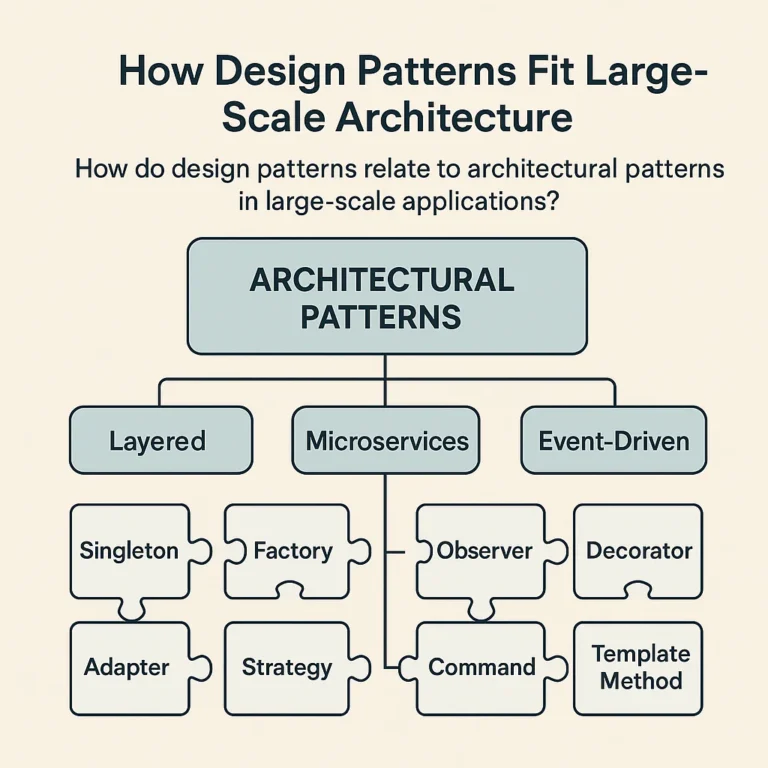
- **Confusing pattern and architecture.** Observer is a pattern; MVC and ECS are broader ways of structuring a system. The label matters less than the responsibility boundaries.
- **Missing built-in alternatives.** Native events, closures, iterators, framework state systems, and dependency containers may already cover the need.

## ✅ Quick Tips for Applying Patterns in Real Projects

1. **Write the pain point in one sentence.** For example: “Changing a control binding currently requires editing gameplay logic.”
2. **Find two examples.** Compare a tutorial with a real repository or official framework docs.
3. **Sketch the simplest version first.** Include who creates objects, who owns them, and what changes.
4. **Use the smallest structure that fixes the problem.** Start with a function or simple state model; add classes when they make variation or ownership clearer.
5. **Test the behavior and transitions.** For a state machine, test allowed and forbidden transitions. For commands, test execute, undo, and redo.
6. **Review after implementation.** Did dependencies become clearer? Did the feature become easier to extend? Did the number of moving parts grow without a payoff?
7. **Explain the design in plain language.** If the team can’t say what the pattern separates or simplifies, it may be decorative.

For more perspectives on development workflows, explore Stack Interface™’s [coding best practices](https://stackinterface.com/category/coding-best-practices/) and [data science](https://stackinterface.com/category/data-science/) categories. And when you encounter a beautifully elaborate design, ask the principal-enginer question from the video: **Would a simpler version be easier for the next person to maintain?**