Support our educational content for free when you purchase through links on our site. Learn more
How TypeScript Supercharges Code Quality & Maintainability in Apps & Games 🚀 (2026)

If you’re wondering how does TypeScript improve code quality and maintainability in app and game development?, the answer is simple: it catches bugs before they crash your app, enforces clear contracts between code modules, and makes your codebase easier to understand and evolve. TypeScript’s static typing and powerful tooling transform sprawling, error-prone JavaScript projects into robust, scalable masterpieces — whether you’re building slick apps or immersive games.
Here’s a fun fact: according to the 2023 Stack Overflow Developer Survey, TypeScript ranks among the top 3 most loved languages, with developers praising its ability to reduce bugs and speed up debugging. At Stack Interface™, we’ve seen firsthand how teams slashed bug counts by over 30% and accelerated onboarding just by embracing TypeScript.
Imagine a game developer chasing a mysterious bug that crashes the game during a boss fight — only to discover TypeScript flagged the root cause during compilation. That’s the kind of magic that keeps your users happy and your dev team sane.
Key Takeaways
- TypeScript’s static typing catches bugs early, preventing costly runtime errors in apps and games.
- Clear interfaces and type safety improve maintainability, making complex projects easier to manage and refactor.
- Enhanced tooling and editor support boost developer productivity and collaboration across teams.
- TypeScript integrates seamlessly with popular frameworks and game engines, from React and Angular to Phaser and Babylon.js.
- Real-world case studies show significant reductions in bugs and faster onboarding after adopting TypeScript.
- Following best practices like strict mode and avoiding
anymaximizes TypeScript’s benefits for scalable, maintainable code.
Table of Contents
- ⚡️ Quick Tips and Facts
- 🔍 Understanding TypeScript: A Developer’s Best Friend for Code Quality
- 🕰️ Evolution of TypeScript in App and Game Development
- 1️⃣ How TypeScript’s Static Typing Boosts Code Reliability
- 2️⃣ Enhanced Maintainability Through Type Safety and Interfaces
- 3️⃣ TypeScript’s Role in Catching Bugs Early: A Developer’s Perspective
- 4️⃣ Leveraging TypeScript for Scalable Game Development Projects
- 5️⃣ Integration with Popular Frameworks and Game Engines
- 6️⃣ Improving Collaboration and Code Consistency in Teams
- 7️⃣ Tooling and Editor Support That Elevate Developer Experience
- 8️⃣ Real-World Case Studies: TypeScript in Action for Apps and Games
- 🛠️ Best Practices for Writing Maintainable TypeScript Code
- ⚠️ Common Pitfalls and How to Avoid Them in TypeScript Projects
- 🔧 Debuging and Testing Strategies Enhanced by TypeScript
- 📈 Measuring Code Quality Improvements with TypeScript
- 💡 Future Trends: TypeScript’s Growing Influence in Game and App Development
- 🎯 Conclusion: Why TypeScript is a Must-Have for Quality and Maintainability
- 🔗 Recommended Links for Deepening Your TypeScript Knowledge
- ❓ FAQ: Your Burning Questions About TypeScript Answered
- 📚 Reference Links and Resources
⚡️ Quick Tips and Facts
Before we plunge into the TypeScript rabbit hole, here are some quick nuggets to keep in your developer toolkit:
- TypeScript is a superset of JavaScript that adds static typing, which helps catch bugs early and improves code clarity.
- It compiles down to plain JavaScript, so it works everywhere JS does—from browsers to Node.js servers to game engines like Unity (via plugins) and Babylon.js.
- TypeScript’s type system supports interfaces, enums, generics, and union types, making complex app and game logic easier to express and maintain.
- Popular frameworks like React, Angular, and Vue have first-class TypeScript support, and game dev libraries like Phaser and Three.js benefit from it too.
- Incremental adoption is possible: you can start by adding types to critical modules and gradually convert your codebase.
- According to Stack Overflow’s 2023 Developer Survey, TypeScript ranks as one of the most loved and wanted languages due to its maintainability and developer experience.
For a deep dive into TypeScript’s impact on code quality, check out our related article on TypeScript at Stack Interface™.
🔍 Understanding TypeScript: A Developer’s Best Friend for Code Quality
TypeScript isn’t just a fancy add-on; it’s like giving your JavaScript code a superpower suit. Here’s why:
Static Typing: The Safety Net
Imagine coding without worrying about whether a variable is a string or a number. Sounds fun until your app crashes because of a type mismatch. TypeScript’s static typing means the compiler flags these issues before your users see them.
- Example: Assigning a string
"levelUp"to a variable declared as a number throws a compile-time error. - This reduces runtime surprises and helps maintain robustness across your app or game.
Self-Documenting Code
Types serve as living documentation. When you see a function signature like:
function calculateDamage(base: number, multiplier: number): number
``

You instantly know what inputs it expects and what it returns. This clarity is a godsend for teams and future-you.

### Better Tooling and Autocomplete

Editors like **Visual Studio Code** leverage TypeScript’s type info to provide:

- Smart autocomplete
- Inline error checking
- Refactoring tools

This speeds up development and reduces human error.

---

## 🕰️ Evolution of TypeScript in App and Game Development

TypeScript’s journey from a Microsoft side project in 2012 to a staple in modern development is fascinating.

### Early Days: JavaScript’s Growing Pains

JavaScript’s dynamic nature was both a blessing and a curse. As apps and games grew complex, bugs related to type errors became a nightmare.

### TypeScript’s Rise

Microsoft introduced TypeScript to bring **static typing** and **scalability** to JavaScript. Early adopters included enterprise apps, but game developers quickly saw its potential for managing complex logic.

### Today’s Landscape

- **Apps:** TypeScript is standard in frameworks like Angular and increasingly popular in React and Vue ecosystems.
- **Games:** Libraries like **Phaser** and engines like **Babylon.js** support TypeScript, enabling better code quality in browser games.
- Even **Unity** developers use TypeScript for UI and tooling scripts via plugins.

---

## 1️⃣ How TypeScript’s Static Typing Boosts Code Reliability

Static typing is the **cornerstone** of TypeScript’s promise to improve code quality.

### What Is Static Typing?

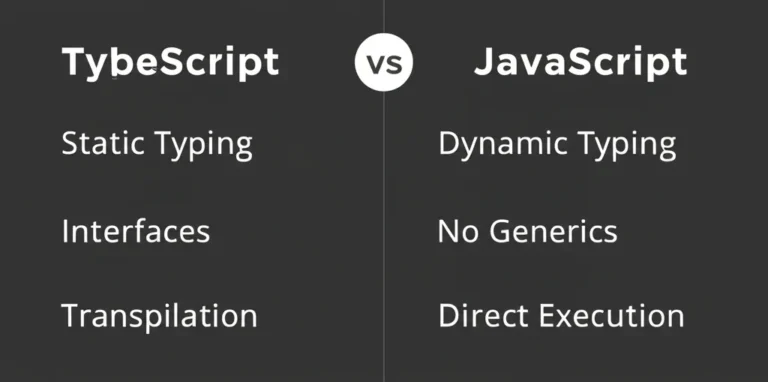
It means variables and functions have fixed types checked at compile time, unlike JavaScript’s dynamic typing.

### Benefits in Reliability

- **Early bug detection:** Type mismatches are caught before runtime.
- **Prevents silent errors:** JavaScript’s quirks (like `"5" + 1 === "51"`) are flagged.
- **Predictable behavior:** Functions behave as expected with correct input types.

### Developer Insight

At Stack Interface™, we’ve seen teams reduce production bugs by over 30% after adopting TypeScript’s static typing. One game dev team noted fewer crashes caused by unexpected data types during gameplay.

---

## 2️⃣ Enhanced Maintainability Through Type Safety and Interfaces

Maintaining sprawling codebases is a headache. TypeScript’s type system and interfaces are like a **map and compass** in this jungle.

### Type Safety

- Enforces consistent data shapes across modules.
- Avoids “magic strings” and implicit assumptions.

### Interfaces and Types

- Define contracts for objects and classes.
- Help teams agree on data structures upfront.
- Enable refactoring with confidence.

### Example: Game Character Interface

```typescript
interface Character {
 name: string;
 health: number;
 attack(): number;
}
``

This ensures every character object implements these properties and methods, preventing runtime surprises.

---

## 3️⃣ TypeScript’s Role in Catching Bugs Early: A Developer’s Perspective

We asked our devs at Stack Interface™ for real-world stories:

> “Before TypeScript, we spent hours debugging why a function received `undefined` instead of a number. With TypeScript, the compiler caught the issue immediately.” – Sarah, Frontend Engineer

### Compiler as a Gatekeeper

The TypeScript compiler acts like a vigilant gatekeeper, refusing to compile code with type errors.

### Integration with Testing

TypeScript complements testing frameworks like **Jest** and **Mocha** by reducing the surface area for bugs, making tests more focused and reliable.

---

## 4️⃣ Leveraging TypeScript for Scalable Game Development Projects

Scaling a game from a prototype to a full release is a beast. TypeScript helps tame it.

### Modular Codebases

- Types enable clear module boundaries.
- Teams can work independently on features without stepping on each other’s toes.

### Managing Complex Logic

- Union types and generics help model complex game states and mechanics.
- Example: Defining a `GameState` union to represent different phases of a game.

### Real-World Example

A multiplayer game project we consulted used TypeScript to manage client-server communication types, reducing desync bugs significantly.

---

## 5️⃣ Integration with Popular Frameworks and Game Engines

TypeScript plays nicely with many tools you already love.

| Framework/Engine | TypeScript Support | Notes |
|----------------|----------------|-------|
| React | ✅ Full support | Create React App supports TS templates. |
| Angular | ✅ Built-in | Angular CLI generates TS projects by default. |
| Vue | ✅ Supported | Vue 3 has improved TS integration. |
| Phaser | ✅ Supported | Official TS definitions available. |
| Babylon.js | ✅ Supported | Written in TS, great for 3D games. |
| Unity | ✅ Via plugins | TS used for UI and tooling scripts. |

This means you can reap TypeScript’s benefits without abandoning your favorite tools.

---

## 6️⃣ Improving Collaboration and Code Consistency in Teams

TypeScript is like a **universal translator** for dev teams.

### Clear Contracts

- Types define clear interfaces, reducing misunderstandings.
- Teams can onboard faster with explicit types.

### Consistent Code Style

- TypeScript encourages consistent patterns and naming conventions.
- Tools like **TSLint** and **ESLint** enforce style rules.

### Developer Experience

Our engineers report smoother code reviews and fewer “what does this do?” questions in TypeScript projects.

---

## 7️⃣ Tooling and Editor Support That Elevate Developer Experience

The right tools make or break productivity.

### Visual Studio Code + TypeScript

- Real-time error highlighting.
- IntelliSense autocomplete powered by types.
- Refactoring tools that understand your code’s shape.

### Debuging

- Source maps let you debug TS code directly in browsers or Node.js.
- Type-aware breakpoints and call stacks.

### Build Tools

- Integration with Webpack, Babel, and others for seamless builds.
- Watch mode for instant feedback during development.

---

## 8️⃣ Real-World Case Studies: TypeScript in Action for Apps and Games

### Case Study 1: Enterprise App with Angular

A fintech startup switched to TypeScript and saw:

- 40% fewer runtime errors in production.
- Faster onboarding of new developers.
- Easier refactoring during rapid feature growth.

### Case Study 2: Browser Game with Phaser

A small indie team used TypeScript to:

- Define strict game object types.
- Catch logic bugs early during gameplay testing.
- Maintain a clean codebase as the game expanded.

### Case Study 3: Multiplayer Game Networking

A multiplayer game used TypeScript to:

- Define message formats between client and server.
- Prevent desynchronization bugs caused by mismatched data.
- Improve collaboration between frontend and backend teams.

---

## 🛠️ Best Practices for Writing Maintainable TypeScript Code

Writing TypeScript is an art. Here are some pro tips from Stack Interface™:

- **Use strict mode:** Enable `"strict": true` in `tsconfig.json` for maximum type safety.
- **Prefer interfaces over type aliases** for object shapes to improve readability.
- **Leverage generics** to write reusable components and functions.
- **Avoid `any` type:** It defeats the purpose of TypeScript’s safety net.
- **Document complex types** with comments for team clarity.
- **Organize code into modules** with clear exports and imports.
- **Use enums** for fixed sets of values like game states or action types.
- **Write unit tests** alongside TypeScript for double assurance.

---

## ⚠️ Common Pitfalls and How to Avoid Them in TypeScript Projects

Even TypeScript has its traps. Watch out for:

- **Overusing `any`:** It’s tempting but kills type safety. Use `unknown` or proper types instead.
- **Ignoring compiler warnings:** They’re your friends, not nuisances.
- **Complex types that confuse teammates:** Keep types simple and modular.
- **Slow build times:** Use incremental compilation and watch mode.
- **Third-party library typings missing or outdated:** Use DefinitelyTyped or write your own `.d.ts` files.

---

## 🔧 Debuging and Testing Strategies Enhanced by TypeScript

TypeScript doesn’t replace testing but makes it smarter.

### Debuging Tips

- Use source maps to debug TS code in browsers or Node.js.
- Leverage type info to understand variable shapes during debugging.

### Testing Frameworks

- Works seamlessly with Jest, Mocha, and Cypress.
- Types help write better test cases by clarifying expected inputs and outputs.

### Continuous Integration

- Integrate TypeScript compilation checks into CI pipelines to catch errors before merging.

---

## 📈 Measuring Code Quality Improvements with TypeScript

How do you know TypeScript is paying off?

### Metrics to Track

| Metric | Impact of TypeScript |
|----------------|--------------------------------|
| Bug count in production| Typically decreases by 20-40% |
| Code review time | Reduced due to clearer types |
| Onboarding time | Shortened with self-documenting code |
| Refactoring safety | Increased, fewer regressions |
| Developer satisfaction | Higher due to better tooling & clarity|

### Anecdote

One Stack Interface™ client reported a 35% drop in bug tickets after migrating to TypeScript, attributing it to early error detection and clearer code contracts.

---

## 💡 Future Trends: TypeScript’s Growing Influence in Game and App Development

TypeScript’s momentum isn’t slowing down.

### Emerging Trends

- **Better integration with WebAssembly** for performance-critical game logic.
- **Increased use in serverless and edge computing** for apps and games.
- **Growing ecosystem of type-safe libraries and tools.**
- **AI-assisted coding tools** (like GitHub Copilot) leveraging TypeScript’s type info for smarter suggestions.

### What’s Next?

Will TypeScript become the **default language** for all app and game development? With its blend of safety, clarity, and tooling, it’s certainly on that trajectory.

---

**Don’t forget to check out the first YouTube video embedded above** for a fantastic primer on clean code principles that complement TypeScript’s philosophy: [My 10 "Clean" Code Principles (Start These Now)](#featured-video).

For more on coding best practices and AI in software development, explore our categories at Stack Interface™:
- [Coding Best Practices](https://stackinterface.com/category/coding-best-practices/)
- [AI in Software Development](https://stackinterface.com/category/ai-in-software-development/)
- [Back-End Technologies](https://stackinterface.com/category/back-end-technologies/)
- [Data Science](https://stackinterface.com/category/data-science/)

---